Guide
The public website
What spectators and players see without logging in: Match Hub, standings, fixtures, stats, and more.
The public site is the league’s shop window. It is mobile-friendly, supports light and dark themes, and updates as soon as results are entered.
Homepage
- Hero — league name, tag line, optional banner image, and shortcuts to standings, fixtures, and stats.
- Match Hub — a date carousel for the active season. Each card shows how many fixtures and results sit on that night. Tap a date to see home/away names, scores, live badges, or VS for unplayed matches.
- Mini standings — top of table for one or more featured divisions (you choose which in Settings).
- Knockouts — links to cup competitions in the active season.
- News — latest announcements, with cover pictures and a play badge on posts that have a video.
- Sponsors — league-wide partners, when banner strips are switched on. See Sponsors.

Fixtures & results
The fixtures page can be filtered by competition, team, and status (all / upcoming / played). A sponsor banner sits above the list when that competition has a sponsor, or when a league-wide sponsor is standing in. The same strip appears on the standings page and on a cup bracket. Three layouts:
- List — grouped by date.
- Round — grouped by gameweek or knockout round name.
- Grid — a home-vs-away matrix, useful for “have we played them yet?” at a glance.


Standings
League tables are calculated from played matches: played, won, drawn, lost, frames for/against, points, and deductions if you have applied any. Switch division with the competition picker. A line above the table states how that division scores (points per frame, per set, for a win, and for a draw). If the format has an odd number of frames and a draw is impossible, the draw column is left off.
Set promotion and relegation places on the competition and the table highlights those zones, with a legend under the table. Deductions are marked on the row and listed underneath with the reason and date.

Competitions
The competitions page lists every season and the leagues and cups inside it, with fixture counts, so supporters can jump to the table, the fixture list, or a cup bracket. Filters narrow that list by team, singles, or doubles, and by league, knockout, or cups that have a group stage.

Player stats
Aggregated singles and doubles frames, win rates, and form. Individual player pages show a career-style summary plus recent frames. Team pages show roster, venue, fixtures, and form. Venue pages show a map and a Directions button. See Teams, players, and venues.
The stats page is also the Elo / FargoRate leaderboard: sort by rating, wins, win percentage, frames played, or (when clearance tracking is on) Break & Dish clearances. Filter provisional vs established players, and open any profile for head-to-head win probabilities. See Ratings (Elo / FargoRate) for how the numbers are calculated.
Live matches
When a captain (or player, for individual events) starts a scorecard, the match can be marked live. The public site shows the running score with a live indicator until the card is finalised. Anyone who has the match page open sees that score keep updating.
Match Hub on the homepage, the fixture list, and the match page all update the score as frames are entered, without anyone refreshing the page.
Match Night TV
For pub TVs and club screens, the site includes Match Night TV at /tv. It displays live match scores, a frame-by-frame teleprinter showing the running score after each rack, and rotating side panels for the league table, cup matches, and sponsors. A venue can also open /tv/venue/:id to focus on matches played at that club. Press F for full screen, and screen wake lock keeps the display awake. See Match Night TV.

Share a night or a result
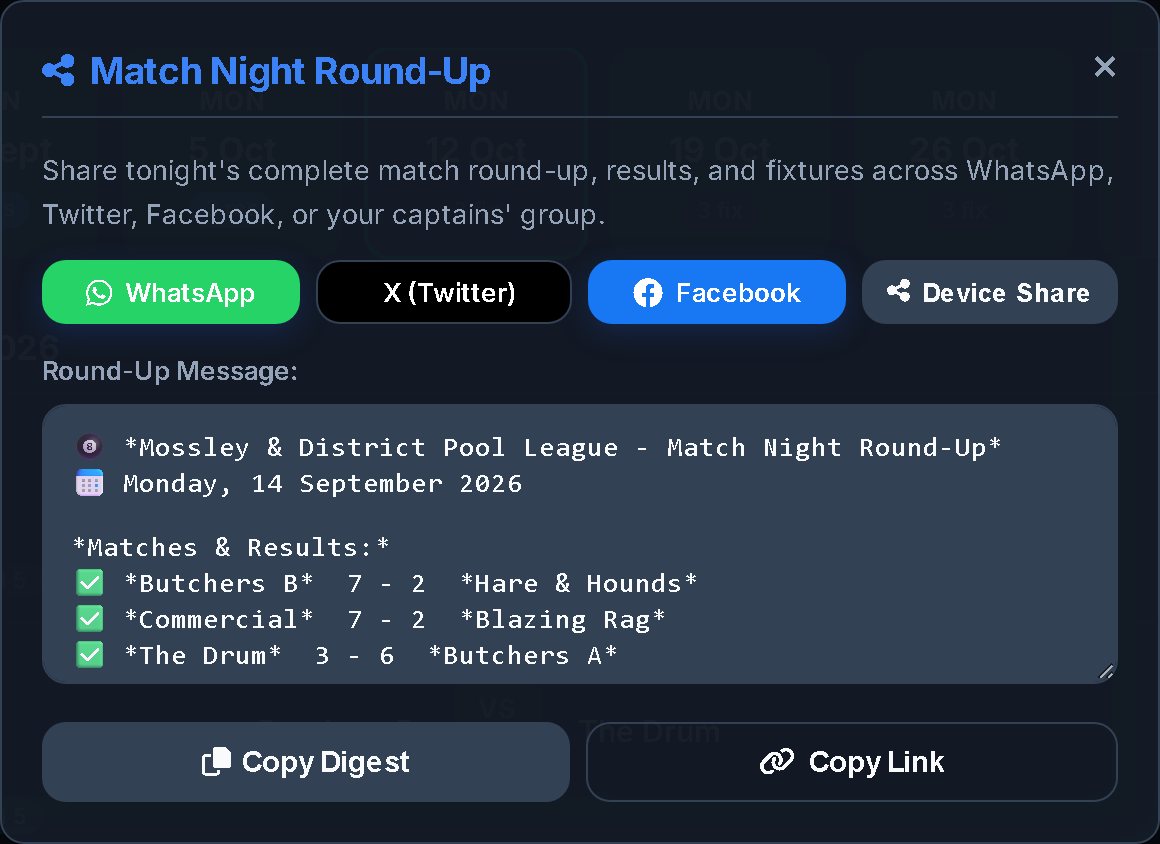
Match Hub has a Share Night button. It builds a message for that date: every fixture, the score if it has been played, the competition, the time, and the venue. Send it to WhatsApp, X, or Facebook, use the phone’s own share sheet, or copy the text and the link. Each public match card has Share Result for a single tie, including a result card you can download as a PNG. The standings page has Share Table, which does the same for the division: a written table, or a picture of it. Turn public sharing off in Settings if the league would rather keep results on the site only.

Social profiles and a homepage feed
Settings can add footer links for Facebook, Instagram, X, YouTube, TikTok, and a WhatsApp group or community. You can also embed a live feed on the homepage: a Facebook page plugin, an X timeline, or your own widget. The section title is yours to set.
Cookies
Visitors get a cookie choice. Essential cookies (login, scorecards, and the choice itself) stay on. Analytics cookies are off until someone allows them.
Install on a phone
The public site is an installable app. Supporters can add it to a home screen; the name, colours, and icon follow your league settings. iPhone and iPad visitors get short install instructions. Once installed it reopens quickly, because styles and images are kept on the phone, while scores and tables are always fetched fresh. With no signal, a page you opened before is shown as a saved copy, marked with the time it was saved. Admin and login pages are never kept on the phone. A sitemap and robots file are generated automatically so search engines can find teams, players, venues, fixtures, and custom pages.
Theme toggle
Visitors can switch light/dark. You set the default for first-time visitors in Settings. Colours for both themes are independently customisable so logos stay readable.